
I pick up my phone, tap Watch, tap a game, and by the time I look up the TV is already playing it. No remote, no boot animation, no row of ads before I'm allowed to see my own apps. That's the whole thing I wanted, and getting there turned into writing the software for most of my house.
It started small. I wanted to change the colour of the light sticks in my office from my laptop. A week later I had a home screen for the TV, a hub on my Mac that talks to every light, speaker and the doorbell, a phone app built around a 3D model of the house, and a room scanner I wrote to make that model. Every figure below is live, and most of them are the real logic, running in your browser.
Why bother
Three reasons, and they all come down to control.
Everything in my house lived in a different app. The lights had two, the speakers had one, the doorbell had one, the TV had its own remote and its own ideas. Doing anything meant remembering which app owned it. I wanted one place for all of it, and I wanted that place to be something I actually enjoy touching.
The TV itself was the worst of it. It boots into an animation, then a home screen that's mostly ads, and only then lets you go find what you came for. I wanted it to open straight into my stuff.
And honestly, I wanted to write the software. When it's mine I can make it as fast as I want, put things exactly where I reach for them, and fix it when it annoys me. I care a lot about the fewest taps to finish a task, and you can't remove taps from software you don't own.
That's the bar for everything here: one or two taps, and it loads fast enough that you never wonder whether it worked.
The boot screen
This is the part I'm proudest of. When my TV turns on now, the stock animation is gone. Instead, my last name gets written across a black screen in the same handwriting as the intro on this site.
Getting rid of the stock boot was the most annoying part of the whole project. It took a lot of trial and error, and in the end some help from a community of people who'd been down the same road, before I had the access to change it. I'm not going to share how. What I will share is what's on the screen now.
The website writes my full name in about a second. On the TV I wanted it slower, so you can really feel it being drawn out. It only writes "Bjorklund", and the pen runs on a 3.2 second clock. It's not hiding anything, either. The home screen is ready behind it at about half a second; the name just gets to finish. If loading ever runs long, a small spinner shows up under the name, and only then.
A few things I learned making it feel right on a TV. The processor in a television is weak, so the pen used to stutter. Now every stroke that's finished gets baked into a mask once, and each frame only draws the strokes still moving. A slow frame can't jump the pen forward, either; it just carries on from where it was. There used to be a five-second black gap before the name appeared, and it turned out the page was waiting on a font from the internet. The fonts ship with the app now. And the background is pure black now. The near-black I started with didn't feel like the TV's own black, and on an OLED you can tell.
A home screen with my stuff on it
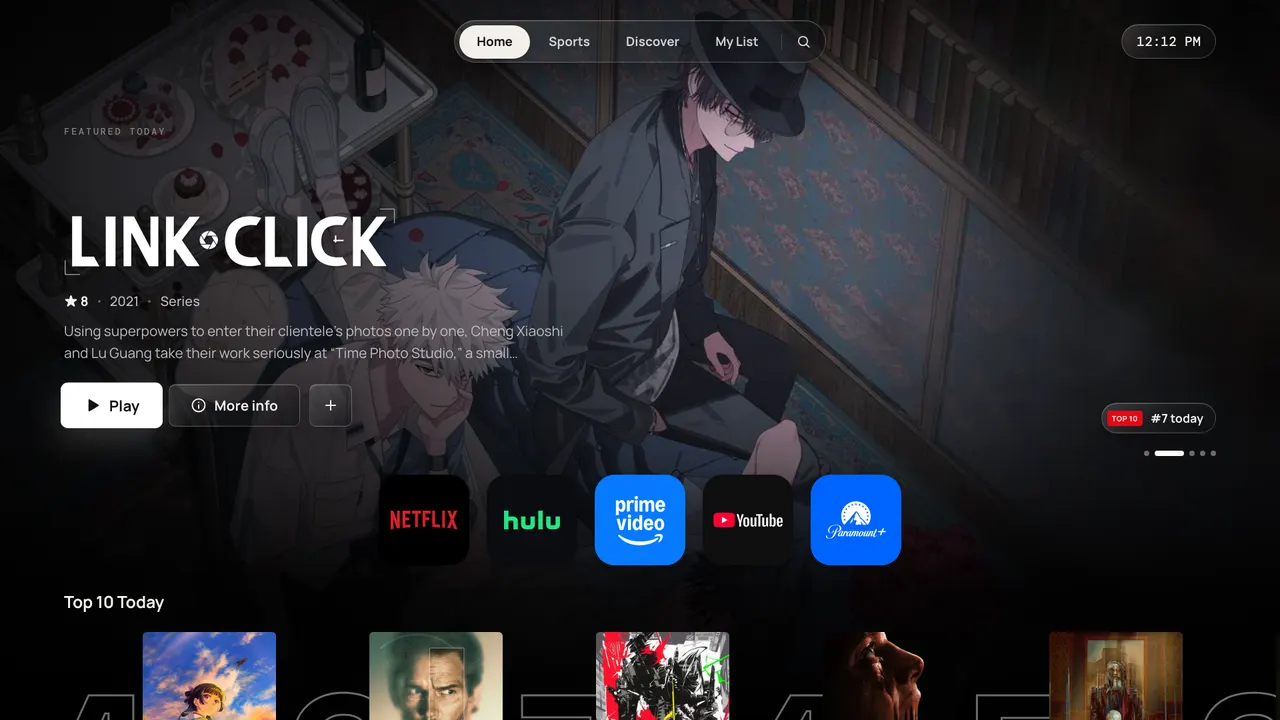
Behind the intro is the launcher: a home screen I wrote that the TV opens into. I wanted it to feel like Apple TV and Netflix at the same time. Big focus states that lift when you land on them, rails you scroll sideways, and tabs that switch as you move across them so you never press OK just to change pages. It has all the movies, TV shows and live sports built in, in one place.
The details that made it feel good were mostly about the remote. Arrows move to the nearest thing in that direction on screen, and left and right never jump rows. Coming back into a rail lands you on the item you were on last. Back steps out one level at a time, the way you'd expect, and the TV's own exit prompt only shows up from the very top of Home. Live scores patch their card in place instead of rebuilding the page, so nothing jumps while you're browsing. Measured on the TV, Home went from well over a second to half a second, and Sports from 1.2 seconds to 0.4.
Multiview
This is the deepest part of the project, and the part that fought me the hardest.
I wanted to watch up to four games at once, the way some cable apps do. The first thing I found out is that the TV can only decode one video at a time. Put two players on the screen and one of them just doesn't play. So the TV can't do multiview by itself. Something else has to.
That something is my Mac. Each game gets copied to the Mac's disk as it comes in, with no re-encoding. Then ffmpeg tiles those copies into a single 1080p stream with every game laid out in its spot, and sends that to the TV. As far as the TV knows, it's playing one video. Every game's sound comes along as its own audio track inside that one stream, so the TV can choose which one you hear.
Working from local copies is what makes it quick. A mix starts in seconds, rearranging the tiles is almost instant because nothing has to be fetched again, and adding a game only waits on that one game's copy. The old mix keeps playing while the new one gets ready, and the swap happens once there's enough of it buffered to not stutter.
The layouts are exact pixel rectangles on a 1920 by 1080 screen, the same numbers on the Mac and on the TV, so what you see is what got encoded. Two games sit side by side. Add a third and one becomes the main game, big on the left, with two small ones stacked on the right. Four is a grid. Press OK on any tile and you get a small menu: make this one main, swap sides, add a game, swap one out, remove it, or go full screen.
Making the sound follow
My favourite detail in multiview is that the sound follows your focus. Move to a tile and you hear that game. No menu, no confirm. It took three tries to get there.
The first idea was a second audio player for the sound. On this TV, starting a second player pauses the video. The second was to pull the audio out of the video with Web Audio and mix it myself. That comes back silent, because the TV plays video on a hardware path the browser never sees. The third was to switch which audio track the stream is playing. That worked, sort of. The switch happened, but the TV kept playing a few seconds of the old game's sound from its buffer, so for most of a second you'd hear the wrong game.
The fix is small and a little silly. Right after the new track's first chunk lands, the video seeks to exactly where it already is. That empties the TV's queue, and you get one hiccup of about 0.4 seconds, then the right game. I also tried patching the player library to do it more cleverly. That made it worse: a 4.8 second freeze. The silly version shipped.
There's a 350 ms wait before the switch, so sweeping across all four tiles doesn't make the sound stutter through every game on the way.
Quality and buffering
One quality trick was my idea, and I'm still happy with it. Each game starts on 720p because it's ready sooner, then slides up to 1080p once that's ready. There's no transition. It just gets sharper.
Buffering is the one I haven't finished. The mix starts about six seconds behind live. Adding another 15 seconds or so of reserve would hide most of the hiccups, and it's a one-line change. For now I've chosen not to, because I'd rather be closer to live. If the stutter starts bothering me more than the delay would, I'll flip it.
Lights that answer back
The lights taught me the most important lesson in the project: sent is not done.
The house has Govee bulbs and a couple of cheap Bluetooth light sticks. I started with Bluetooth for everything. My script would send "blink" to every bulb and report success for every one. Nothing blinked. The bulbs were accepting the connection and then answering nothing at all, not even a status request. The script had been telling me "sent" and I'd been reading "done".
The fix was the bulbs' local Wi-Fi control, which answers back. Now a light isn't "on" until it says it is. Then there was the problem of naming three identical bulbs. The first guess came from Bluetooth signal strength: the two strongest were probably the two closest to the hub. After that I named each one the old way. Blink it three times, ask which one lit, write it down. Every light is keyed by its permanent ID rather than its address on the network, because one of them had already moved.
The light sticks had their own quirk. They remember their last brightness, which can be zero, and the hub can't read their state. So "on" was sometimes on and dark. Now "on" also sets full brightness whenever the level is unknown. Small thing. It was annoying every single time before it was fixed.
All the scenes are 2700K soft white, and every light has a one-tap "Soft white" button to bring it back after a colour.
Scanning the house
I knew early that the app had to be built around the house itself. For the lighting to look right, you have to see it in 3D. Which meant I needed an accurate model of my house, and I didn't have one.
The first floor plan came from 18 wide-angle photos, and it was wrong in ways I noticed instantly: rooms on the wrong side, closets that weren't there. So I wrote a scanner. It's a small iPhone app built on Apple's RoomPlan that walks the whole house in one pass, saves each room as soon as it's done, and takes a photo with its camera position every few steps, about a thousand in total. When it's finished, it sends the whole scan to my Mac.
The scan was far better, walls to within about 5 cm, but RoomPlan has opinions. It found 16 cabinets that don't exist, decided a half wall was a table, and missed the TV entirely. And my house came out a few degrees crooked, because a scan is a person walking around with a phone. The walls are supposed to be straight.
Squaring it was a nice little problem. Every wall votes for the angle it's off by, weighted by its length, and the whole house turns by whichever angle wins. Then shared walls snap to exactly 0 or 90 degrees, as long as that stays within about 20 cm of where the scan put them.
The 3D model gets built by Blender, but not on my Mac. It runs headless in the cloud on Modal: the build on CPUs, the renders on a GPU. The whole 3D house, with every rebuild along the way, cost about 35 cents. Every piece of furniture and every device is modelled in code from its real dimensions, and the textures are all free to use.
My favourite bug of the whole project lives here. On the phone, every single surface in the house was grass. The floors, the couch, the TV. All grass. Every material had been pointing at the same texture file name, and the phone's format kept only the last one written, which happened to be the lawn. Blender's own renders looked perfect the whole time, which made it very confusing for about ten minutes.
Here's a little living room built the same way, from boxes and light, that you can play with. It isn't my house. Tap a light to toggle it, or pick a scene.
The app
The phone app is the house. The 3D model fills the whole screen, and a glass card sits at the bottom like the one in Maps. Drag to orbit, pinch to zoom, tap a room to fly into it, tap a lamp to open its controls. Each light in the model glows with its real colour and brightness, and the whole house dims when most of the lights are off, so you can tell at a glance what's on without reading anything.
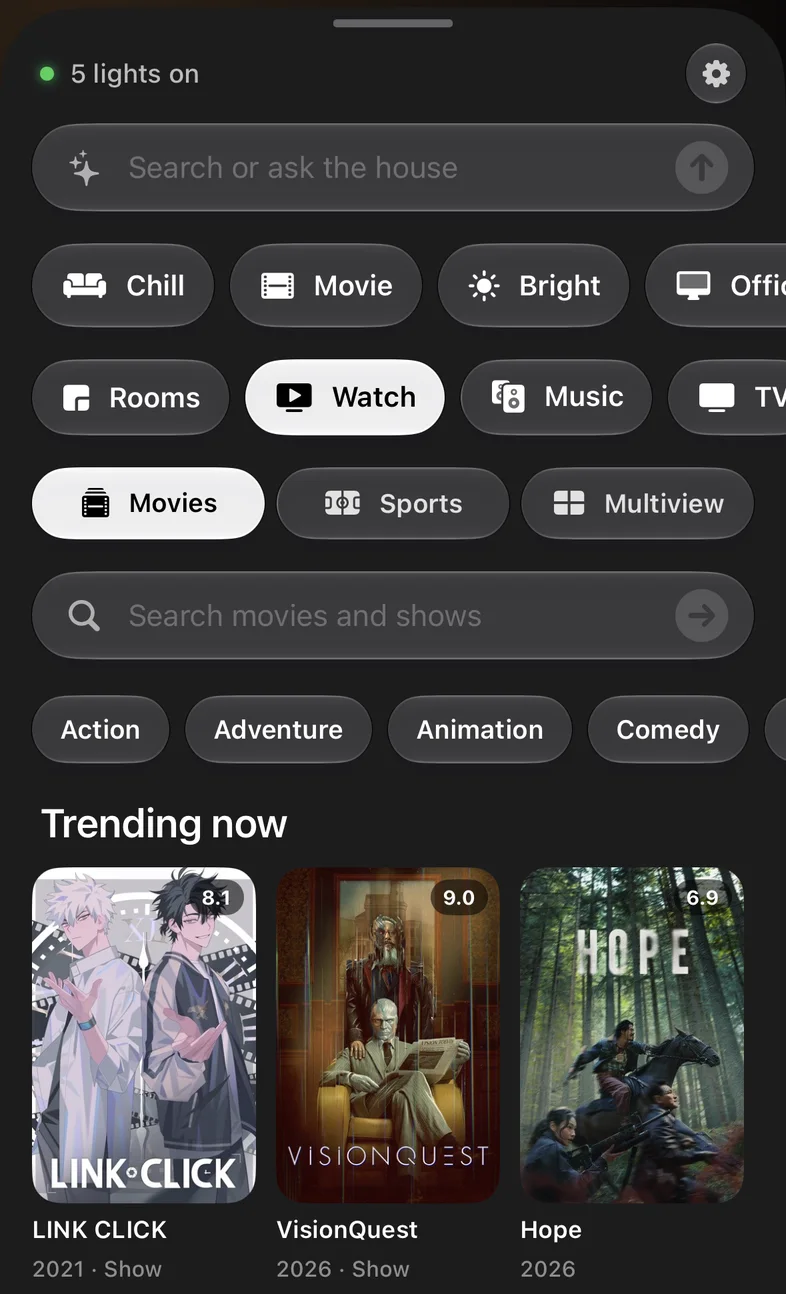
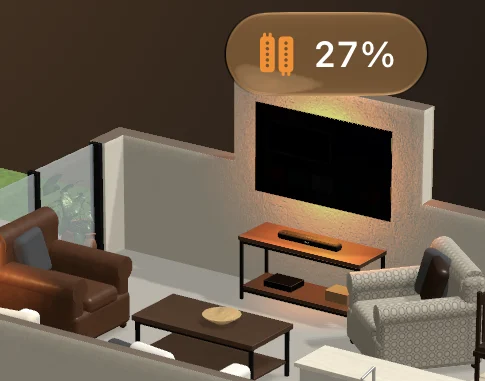
On an iPhone 15 Pro it loads in under a second and runs at 60 frames a second with shadows and every light. I used SceneKit instead of RealityKit, because SceneKit keeps the material names from the model, so each light's glow can be found and recoloured, and it only redraws when something changes, which saves battery. The tiny lamps were almost impossible to tap until I gave each device an invisible tap box at least 45 cm across. The smallest box under your finger wins.
The card is where the fewest-taps idea lives. The resting state already has the status line, the ask bar and the scenes, so dimming the house for a movie is one tap after you open it. Watch is right there too. Pick a movie or a game and it plays on the TV, and if the TV happens to be in some other app, the hub switches it back to my launcher first, by itself. Multiview has its own little editor on the phone, a TV-shaped grid where you tap a game to give it the sound and drag to swap them.
The doorbell is in there as well. When someone rings, the app shows a banner and a small live view floats over the house. On the TV, the camera pops up in the corner over whatever's playing, and it does it without touching the video player, because the TV only has the one. It's a fast stream of still frames instead of a video, so the movie keeps playing underneath. Back dismisses it.
Just words
The bar at the top of the card says "Search or ask the house". Right now it's a parser I wrote on purpose: instant, works offline, and it understands scenes, the TV, volume and lights with a percentage or a colour or "warmer". It's built so the actions behind it can be handed to a model as tools later, with one rule: the AI can't do anything you can't do by hand.
But the part that surprised me is that I already control my house with plain words, every day, just by typing to the coding agent I built all of it with. It knows the hub, it knows every light, and it runs the same actions the buttons in the app do.
"Give me a nice vibe in my office." "Brighter, a little more productive." "Turn them all to soft white, 100%." That works today. Putting it inside the app is the next thing I'm building.
What it feels like now
Day to day, the best part is how little I think about it. The TV turns on into my name and then my stuff. A game is two taps away on my phone. Four games is a few more, and the sound goes wherever I look. The lights say what they are, and they're always soft white unless someone asks for a vibe.
The house runs on my software now. When something bugs me, I fix it. That was the whole point.
Sources
- Apple, RoomPlan, Apple Developer Documentation.
- R. Pantos and W. May, RFC 8216: HTTP Live Streaming, IETF.
- FFmpeg, xstack filter, FFmpeg Filters Documentation.
- Modal, Documentation.
- three.js, Documentation.